OS Launcher Theme
- 4.6
- Rating
- 1.00M
- Installs
- Free
- Price
 Analysis by App-foxy
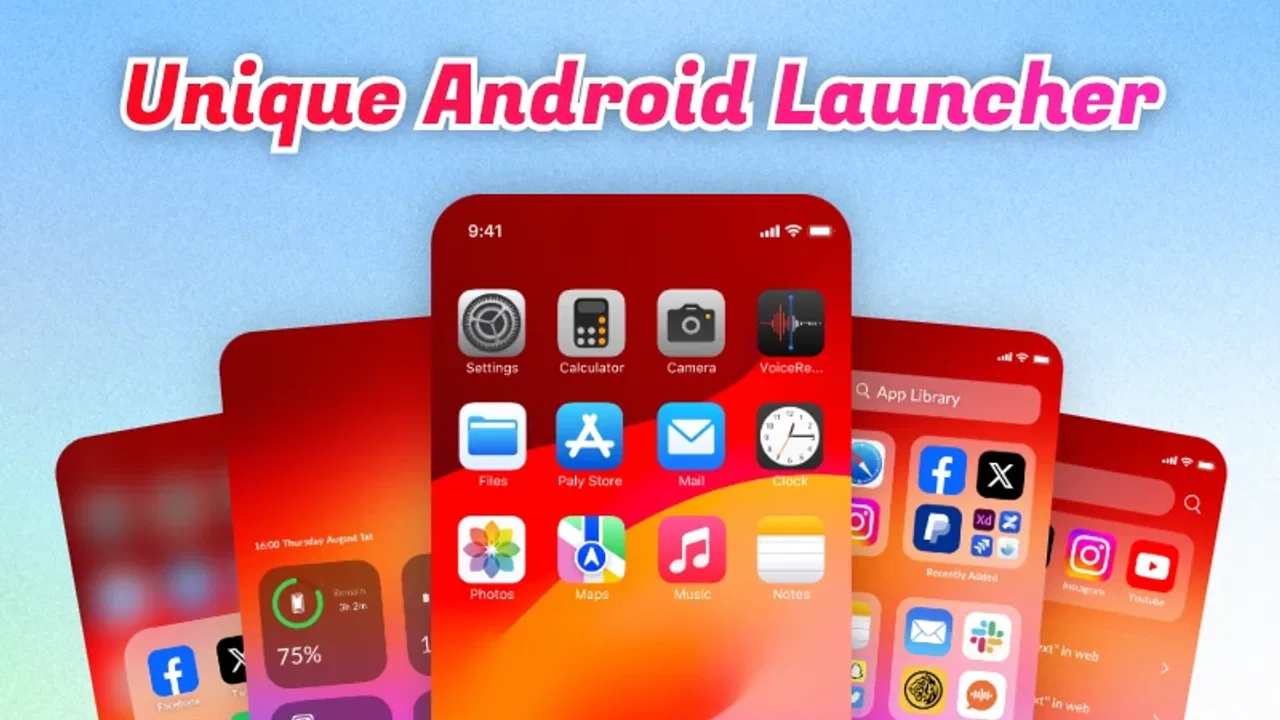
I approached OS Launcher Theme as a practical personalization app rather than just another visual skin. Its purpose is straightforward: give an Android phone a different launcher experience, with the look and feel of an operating-system-inspired home screen. After spending time with it, I found the appeal is less about adding endless tools and more about changing the first screen I see every time I unlock my phone.
That focus makes it easy to understand, but it also creates an important question: is a dedicated launcher theme genuinely more useful than the launcher already installed on your phone? My answer is yes for people who want a cleaner, more distinctive interface without paying for a customization package. However, it is not automatically the best choice for users who need deep automation, highly detailed icon editing, or a launcher built around productivity.
How OS Launcher Theme feels in everyday use
The app sits in the personalization category and is developed by iApp. It is free, rated for Everyone, and has already passed the one-million-install mark, which gives it a much more established feel than a brand-new experiment. Its average score is 4.6 from roughly 6.2 thousand ratings, so the overall reception is clearly positive, although a score alone cannot tell you whether its style matches your preferences.
You May Also Like

 Blood Strike: 2.5 Anniversary
Blood Strike’s Loadouts Turn Every Drop Into a Tactical Gamble
A close look at Blood Strike’s custom loadouts: how fast access to signature weapons reshapes its battle royale rhythm, rewards preparation, and narrows the gap between fights.

 Pandora - Music & Podcasts
Pandora’s Music Is Easy to Start, but Harder to Recover
Pandora’s strength is its low-effort path from a seed to a station. Its weak spot is how much confidence it asks you to place in connection, setup, and quiet recovery.

 8 Ball Pool
 Is Built on Rivalries, Rematches, and Routine
A close look at the rivalries, rematches, shared routines, and unanswered safety questions that turn a quick pool match into a persistent mobile community.

 Samsung Music
’s Quiet Strength Is Playing What You Already Own
Its reach comes less from spectacle than from dependable access to a personal library. That simplicity is both the app’s strongest retention engine and its ceiling.

 AccuWeather: Weather Radar
AccuWeather Review: A Quick, Clear Forecast for Everyday Decisions
For everyday plans, the best forecast is the one you can understand quickly. AccuWeather makes rain timing, radar, and local conditions easy to act on, with a few trade-offs.

 Hill Climb Racing
Why Hill Climb Racing Still Turns Crashes Into One More Run
A tiny car, a bumpy hill and one more upgrade: Hill Climb Racing keeps resurfacing because its simple chaos makes every near-miss feel personal.
More From Our News Desk



The first thing I noticed is that a launcher changes more than the wallpaper. It affects how I reach apps, how much visual noise I tolerate, and whether the home screen feels like a useful starting point or merely a decorative page. OS Launcher Theme is aimed at that complete first impression. Instead of asking me to assemble a theme piece by piece, it presents a ready-made direction that is easier to try and easier to abandon if it does not suit me.
That simplicity is one of its strongest qualities. I did not have to spend a long time learning a complicated customization system before seeing the point of the app. For someone who wants an immediate visual refresh, this is more approachable than a traditional launcher with several layers of menus, gesture settings, icon packs, grid controls, and backup options.
At the same time, a themed launcher always changes the rhythm of ordinary tasks. Opening the app drawer, locating a frequently used application, and returning home can feel slightly different from the familiar Android setup. I recommend giving yourself a short adjustment period rather than deciding after a few seconds. The visual change may be instant, but muscle memory takes longer to settle.
A realistic morning routine
Imagine a typical morning: I unlock my phone, check a message, open the calendar, then return to the home screen before leaving for work. In that situation, the value of this app is not a dramatic new function. It is the way a consistent theme makes the phone feel less ordinary and more intentional. If I keep only the apps I actually use on the main screen, the launcher can also encourage a less cluttered starting point.
That workflow reveals a useful trade-off. A striking interface can make the phone more enjoyable, but it can also tempt me to prioritize appearance over speed. I found the best result came from treating the theme as a framework and keeping my own app arrangement restrained. Filling every available space with shortcuts would undermine the clean impression the launcher is trying to create.
What the current release tells me
The current version is 1.0.3, and the app was released on October 30, 2025. Those details matter because this is still a relatively early product rather than a mature launcher with years of accumulated settings and refinements. I see that as both an advantage and a caution: the experience can feel focused, but users should not expect the breadth of a long-established customization platform.
From a review perspective, the version number suggests that iApp has already moved beyond the first public build and has had an opportunity to refine the initial experience. I would still judge it primarily by what it does today, not by assumptions about future additions. A small version increase can improve stability or polish without turning a focused theme into a full replacement for every advanced launcher on Android.
The minimum operating-system requirement is Android 7.0, so the app is accessible to a broad range of compatible devices. That is helpful for people using older phones who still want a refreshed interface. On newer hardware, the more relevant question is not compatibility but whether the theme offers enough control to justify replacing the default launcher.
How it compares with a standard launcher
The launcher that comes with a phone usually wins for familiarity, manufacturer integration, and predictable behavior. It may also connect more naturally with the device’s own widgets, search tools, and system gestures. If everything already feels comfortable, OS Launcher Theme has to earn its place through appearance and simplicity rather than by promising to replace every built-in function.
Compared with a general-purpose third-party launcher, this app appears more focused. A power-user launcher normally gives me a large toolbox: custom grids, gesture actions, folder behavior, icon sizing, transition effects, backup systems, and extensive layout rules. That flexibility is valuable when I want to design a very specific workflow, but it also creates decision fatigue. OS Launcher Theme is more appealing when I want a coherent visual direction without turning home-screen design into a weekend project.
There is also a difference between a complete launcher and a wallpaper or icon pack. A wallpaper changes the background, while an icon pack changes selected symbols. A launcher theme can influence the overall home-screen experience, which is why it feels more substantial than either option alone. The trade-off is that it may interact with the phone’s existing launcher behavior, so users who depend heavily on manufacturer-specific features should test it carefully before making it their permanent default.
Small choices that make the biggest difference
My first practical tip is to photograph or remember the current home-screen layout before switching. This is not because the change is difficult, but because a themed launcher can make a familiar arrangement look different enough that restoring it becomes slower than expected. Keeping a mental map of the apps I use most often saved me from confusing a visual problem with a navigation problem.
My second tip is to start with a deliberately small home screen. I placed only the apps I open every day in easy reach and left less-used tools for the app drawer. This made the theme feel more coherent and reduced the time spent scanning rows of icons. The result was better than simply transferring every shortcut from my previous setup.
A third useful insight is to evaluate the launcher at different moments of the day. A theme that looks attractive in bright indoor light may feel too busy at night, while a darker or more restrained design may remain comfortable in both situations. I also paid attention to one-handed use: visual style is secondary if the most important apps are awkward to reach.
Finally, I would not judge the app solely from a screenshot. Launcher themes are interactive. The real test is how quickly I can return home, locate a less-used app, and resume a task without thinking about the interface. That is where a beautiful design either becomes part of the phone or starts to feel like an obstacle.
Where the experience may fall short
The main limitation is the likely gap between a focused themed launcher and a highly configurable alternative. People who enjoy adjusting every detail may find a ready-made design restrictive. If I want precise control over spacing, gestures, folder presentation, icon geometry, or complex shortcuts, a specialist launcher may be a better fit even if it takes longer to configure.
There is also a possible adjustment cost for users who switch between several phones. A themed layout can become comfortable on one device, but moving to another handset may expose differences in screen size, default navigation, or manufacturer behavior. That does not make the app unsuitable, but it means the experience is not completely independent of the phone underneath it.
Another consideration is that visual consistency can be affected by apps that do not match the chosen style. Everyday Android use involves many applications from different developers, and a theme cannot make every third-party screen look identical. I found that the launcher’s strongest effect is on the home screen and app-entry experience; once I opened an unrelated app, its own design naturally took over.
Users who depend on a familiar default launcher should also think about the cost of change. A new interface may look fresh at first but create friction when I am in a hurry. That is why I would install OS Launcher Theme first as an experiment, use it through ordinary routines, and only then decide whether it deserves to remain the default.
Who should install it
I would recommend it to someone who wants a free way to make an Android phone feel visually different without building a theme from multiple separate downloads. It is especially suitable for casual personalization, older compatible devices, and users who prefer a guided style over a long list of technical settings.
It is also a sensible option for people who treat their home screen as a mood-setting space. A phone is something I look at dozens of times a day, so a thoughtful visual change can have more impact than its technical simplicity suggests. The app works best when I want the phone to feel refreshed, recognizable, and less tied to the manufacturer’s default presentation.
I would skip it if my priority is advanced productivity automation. Users who need elaborate gestures, detailed layout rules, extensive widget management, or a carefully engineered workflow should compare it with a mature power-user launcher. The same applies to anyone who dislikes changing established habits simply for a new appearance.
What existing users should expect from the current version
For existing users, version 1.0.3 is best understood as a current snapshot of a focused product. The release history implied by the version suggests ongoing refinement, but I would not treat that as a promise of particular upcoming tools. The sensible approach is to appreciate the present launcher for its current visual experience and judge future updates when they actually arrive.
That distinction is important with personalization apps. People often install them because they hope a later update will add more controls, broader compatibility, or extra theme options. Those possibilities may be appealing, but they should not be part of the buying decision here because the app is free and the immediate question is whether its existing approach works for you.
The positive reception and install base make OS Launcher Theme easier to consider than an unknown launcher, but popularity is not a substitute for personal fit. I would still spend time checking the home screen, opening the app drawer, and using the phone one-handed. Those simple tests reveal more than a rating when the product’s main purpose is changing daily navigation.
What I would watch next
If I continue using it, I would watch how iApp develops the balance between simplicity and control. The most valuable future progress would not necessarily be a flood of decorative options. I would rather see careful improvements that preserve the quick setup while making the layout easier to adapt across different Android phones.
I would also pay attention to how well the launcher remains comfortable after the novelty fades. A theme succeeds when it still feels clear after several days of routine use, not only when it looks impressive immediately after installation. Consistent navigation, sensible placement, and a calm visual hierarchy matter more to me than an increasingly elaborate appearance.
My final view is favorable but measured. OS Launcher Theme is a good choice when personalization means a coherent new starting point, not unlimited control. It is free, accessible on Android versions from 7.0 onward, and backed by enough user interest to deserve a serious trial. I would recommend it to a friend who wants a quick visual change and does not need a professional-grade launcher toolkit. For everyone else, especially customization enthusiasts, the default launcher or a more configurable alternative may remain the smarter long-term home.
FAQs for OS Launcher Theme
01What is the OS Launcher Theme and how does it enhance my device?
The OS Launcher Theme is a customization app designed to transform the look and feel of your device's user interface. It provides a fresh, aesthetically pleasing experience by altering icons, wallpapers, and overall design. This app can make your device appear more modern and organized, improving both functionality and visual appeal.
02Is the OS Launcher Theme compatible with all Android and iOS devices?
The OS Launcher Theme is compatible with a wide range of Android devices, typically those running Android 5.0 and above. However, for iOS, functionality may be limited as Apple restricts third-party launcher apps. Always check the app store listing for specific compatibility details before downloading.
03Does using the OS Launcher Theme impact my device's performance?
While the OS Launcher Theme is designed to be lightweight, any additional app can potentially impact performance, especially on older devices. Users might experience minor slowdowns or increased battery usage. It's recommended to monitor your device's performance post-installation and adjust settings as needed to optimize efficiency.
04Is the OS Launcher Theme safe to use, and how can I ensure my data is protected?
The OS Launcher Theme is generally safe, particularly if downloaded from reputable sources like the Google Play Store or Apple App Store. To ensure data protection, always review app permissions during installation and avoid granting unnecessary access. Regularly update the app to benefit from security patches.
05Are there any costs associated with using the OS Launcher Theme?
The OS Launcher Theme often offers a free version with basic features, but premium features may require in-app purchases. These can include additional themes, ad removal, or exclusive customization options. Review the app’s pricing structure in the app store to understand any potential costs before committing.
Pros
- Customizable interface with themes.
- Smooth performance and transitions.
- Low battery consumption.
- Frequent updates and support.
- Easy to navigate settings.
Cons
- Limited free theme selection.
- Occasional ad interruptions.
- Requires storage permissions.
- Some features require payment.
- Compatibility issues on older devices.

OS Launcher Theme
Gallery